Why I did it
I look after a lot of small apps and sites, and I cannot read every line of every one of them every week. AI can, so I use AI tools to scan my work for security problems regularly, fix what turns up, and check that the fix is live.
The last full sweep ran on 24 and 25 October 2026, days after the PHP2Shell incident covered in our previous article. That story had a lesson I took personally. AISA board director Scarlett McDermott, quoted by iTWire, put it this way: “If you don’t know what software you’re running, you can’t know whether you’re vulnerable.”[1] Knowing what I run, and checking it, is exactly what an AI-assisted sweep gives me.
AI is also good at this kind of work in principle. Google’s Project Zero reported in November 2024 that its Big Sleep agent found an exploitable bug in the SQLite database before it reached an official release, and said finding bugs before release means “there’s no scope for attackers to compete”.[2] Defenders using the same kind of tools is the hopeful half of the AI-and-security story.
70
repositories scanned
plus 28 live sites
26
web apps tested
in a real browser
11/14
findings closed
1 partly, 2 low-priority left
0
Next.js advisories left
all 25 apps upgraded
From the author’s own security report of 25 October 2026. The report is not public; the figures are the author’s, not independently audited.
What I scanned
The scope was my whole GitHub account: 70 repositories. That means 25 Next.js web apps, one Python backend, two Cloudflare Workers, 19 Apple apps, 6 Flutter and Android apps and 17 static sites, plus the public portal and 28 live app sites, which got read-only checks. Nothing outside my own code was attacked.
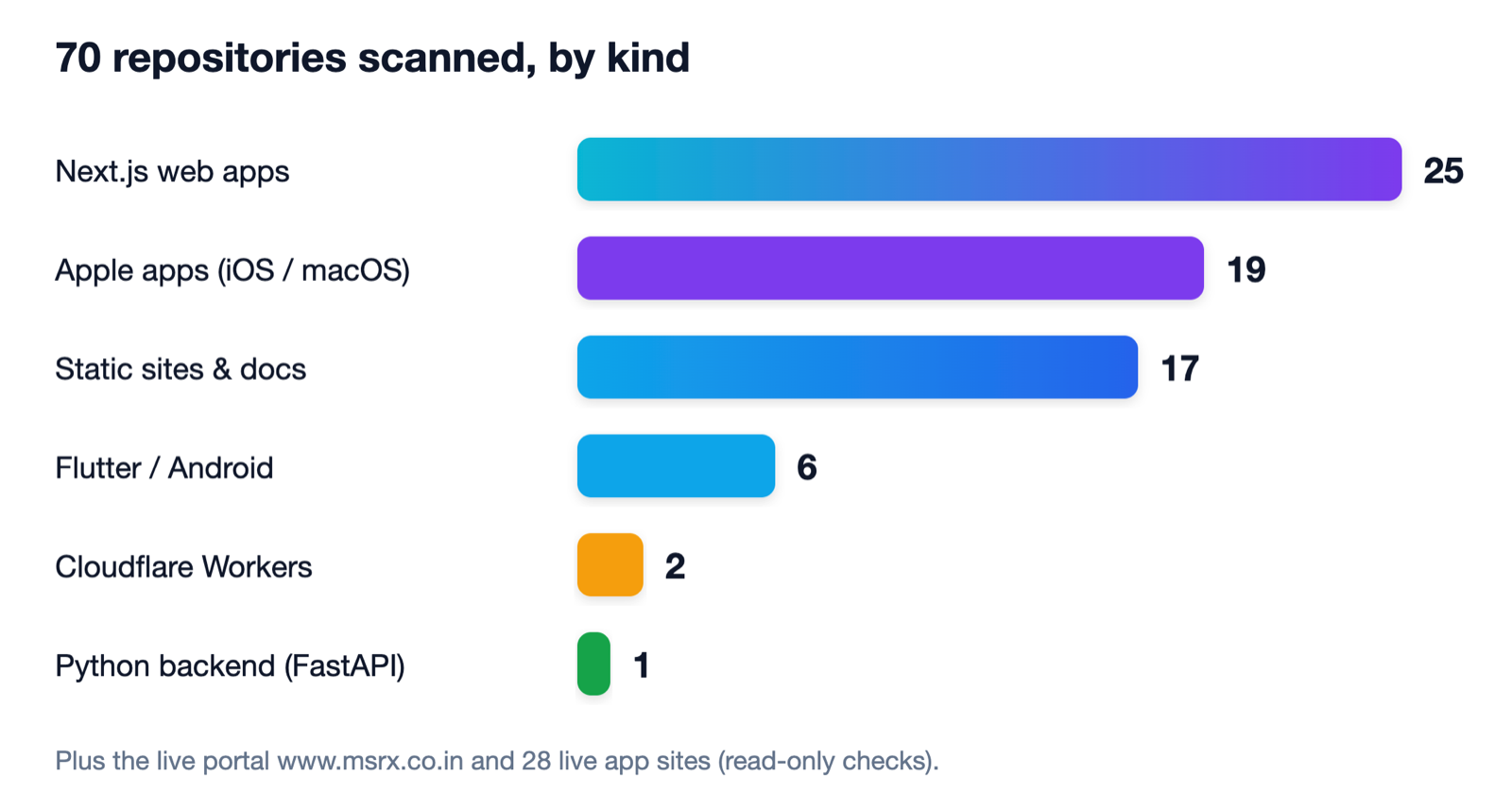
The depth varied by kind. The web apps got the full treatment: dependency audit, secret scan, static analysis, every API route read, a local production build and tests. The native apps got secret scans and a search for risky patterns. The static sites got a hunt for unsafe HTML and a look at any serverless folders.
How AI scanned it
I combined three kinds of evidence, because each one catches things the others miss: reading the code, running the code, and attacking the running code. The categories line up with how security people think. OWASP’s 2025 Top 10 lists Broken Access Control first and Software Supply Chain Failures third, and those two themes turned out to matter most in my sweep.[3]
Secret scan and code review
Dependency advisories
Build, tests and a browser crawl
Penetration tests on the author’s own builds
Load test
Live checks, read-only
From the author’s report. “Penetration tests” here means tests against the author’s own code and local builds, never anyone else’s systems.
The unit and integration runs are worth a mention. Running each repository’s own 5,984 unit tests found one failure, a timezone assumption. The browser crawl of 484 pages and the load test of 727,639 requests at 500 concurrent users turned up no crashes. For me the best moment was seeing 112 of 113 conclusive attack tests pass, and understanding why the one that did not mattered only off my hosting platform.
What it found
The sweep recorded 14 findings: one critical, four high, three medium, three low and three informational. By the end of the clean-up, 11 were closed and verified, one was partly closed and two low-priority items remained.
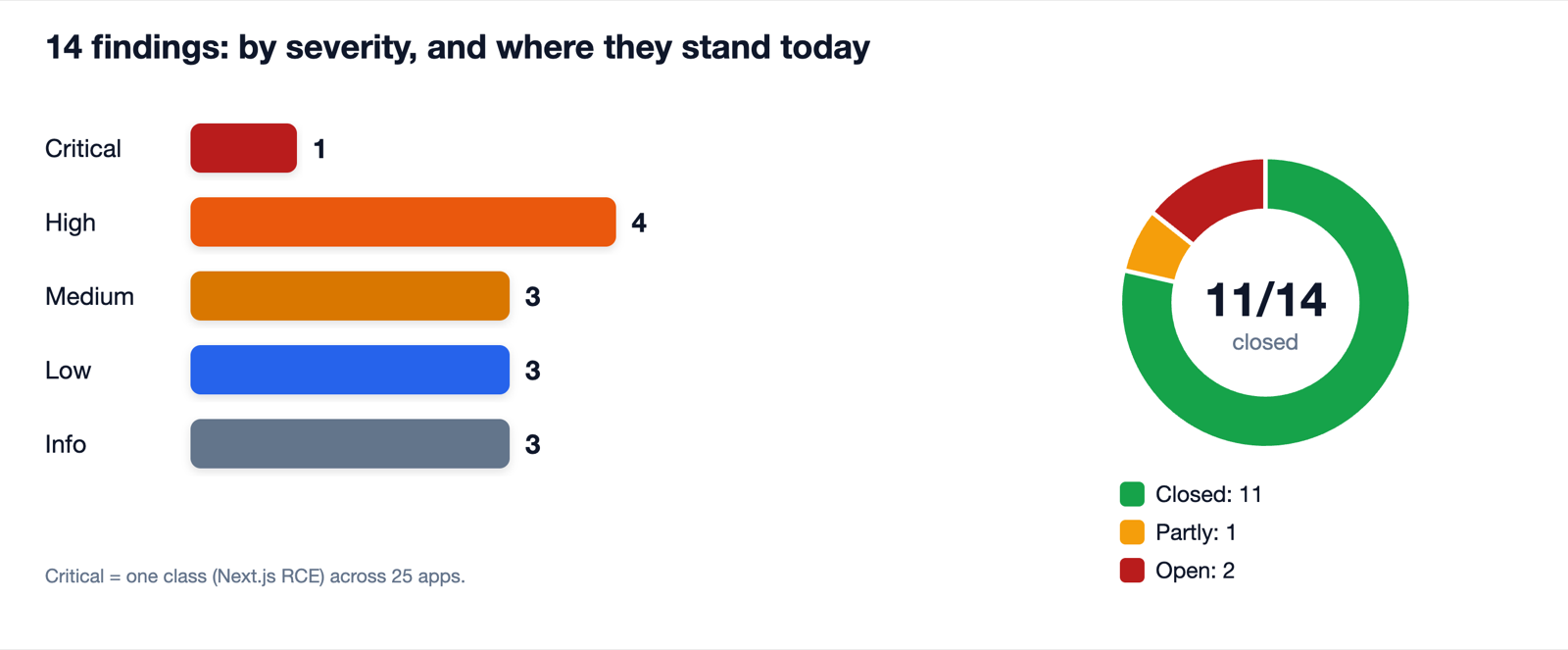
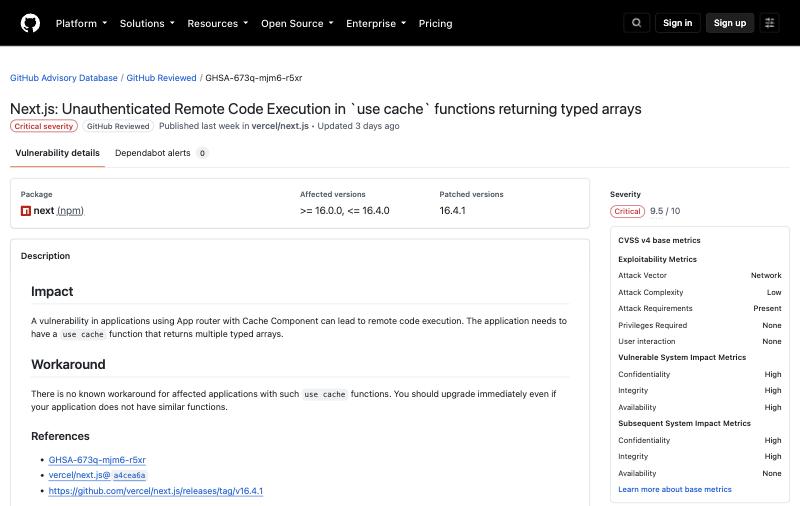
The single critical item was the sort of problem that is hard to spot by hand at scale. All 25 of my Next.js apps were on versions affected by at least one of three published advisories for remote code execution. The advisories are rated critical, 9.5 out of 10, and each lists a patched version.[4][5][6]
| Advisory | When it applies | Affected next | Patched |
|---|---|---|---|
| GHSA-673q-mjm6-r5xr | App Router with Cache Components, a use cache function returning multiple typed arrays | 16.0.0 to 16.4.0 | 16.4.1 |
| GHSA-2464-fhr4-w9xw | Image Optimization API when SVG files are used, on glibc-based Linux | 10.0.0 to 15.5.27, and 16.0.0 to 16.4.0 | 15.5.28, 16.4.1 |
| GHSA-vcvr-r3jv-pc5j | next/og ImageResponse (Node.js) when attacker-controlled values reach SVG content | 16.2.0 up to 16.3.6 | 16.3.6 |
From the three GitHub advisories, all rated critical (CVSS 9.5). The author’s apps now run 16.4.2, above every patched version.
A fair note on the detail: each advisory applies only under certain conditions, such as an App Router app with a particular caching function, SVG image optimisation on Linux, or attacker-controlled input reaching an image generator.[4][5][6] I did not work out which of my 25 apps met those conditions. I did not need to: the first advisory itself says to upgrade immediately even if your application does not have similar functions.[4] Upgrading all 25 to 16.4.2, which is above every patched version, was faster than arguing about exposure.
| Severity | What the scan found | What changed |
|---|---|---|
| Critical | A framework advisory let a stranger run code on the server, across 25 apps | All 25 upgraded; no advisories left |
| High | A URL-fetching feature could be pointed at internal addresses, and one tool used a shell | Internal addresses refused, shell removed, origin check and rate limits added |
| High | Any signed-in user could read group invite codes and join any group as its owner | Database rules tightened; invites redeemed through one checked server step |
| High | New accounts could approve their own role in a patrol app | Role-based database rules, tested in an emulator (19 of 19) |
| High | Critical and high library advisories in 6 apps | Upgraded or overridden; unused packages dropped |
| Medium | A login cookie that never expired and could not be revoked | Signed, expiring sessions and login throttling |
| Medium | AI endpoints that any website could call, without limits | Same-origin checks, size caps and rate limits |
| Medium | A form that stored the whole request body | Field allow-list, size cap and rate limit |
The eight biggest items among the 14 findings, described generally. All were fixed and checked on the live system.
How AI helped fix it
Finding is half the job. The AI also made the changes, one app at a time: each app got its own branch and pull request, so one failure never blocked the others, and merges waited for checks to pass. Every change followed the same seven steps.
1
Scan
secrets, dependencies, static analysis
2
Triage
severity, and proof where possible
3
Fix
one branch per app, smallest change
4
Pull request
checks run on a clean clone
5
Merge
only on green checks
6
Deploy
git push, or a command-line deploy
7
Verify
a live request, a browser crawl
The seven steps every fix followed, from the author’s report. The last step is the one that matters most.
Some steps needed a human, and that is how it should be. Three of the high-severity fixes needed something only I could do, such as applying a database change or setting a secret in a dashboard. I did each, and each was then checked on the live system. A scheduled-job endpoint that now answers 401 without its secret, a database migration that reports “up to date”, a policy that produced zero violations across 257 live pages: those are proofs, not promises.
Merged is not the same as live
The most useful discovery of the whole exercise was not a bug. Three of my apps are not connected to my host through git; I deploy them from the command line. Their last deploys were weeks old, so security fixes sitting on my main branch were never reaching visitors. A second, related slip: one community site had two diverging copies of its repository, and a fix had gone to the copy that was not live.
Merge, and it deploys itself
Merge, and nothing happens
From the author’s report. Fix: sync every local copy to GitHub first, check what the host is actually serving, then deploy and verify with a live request.
The AI found this because it did what I rarely do: it synced every local copy to GitHub first, then checked what the host was actually serving. If you take one habit from this article, make it that: after a fix, ask the live site, not the code.
Beyond the fixes: raising the floor
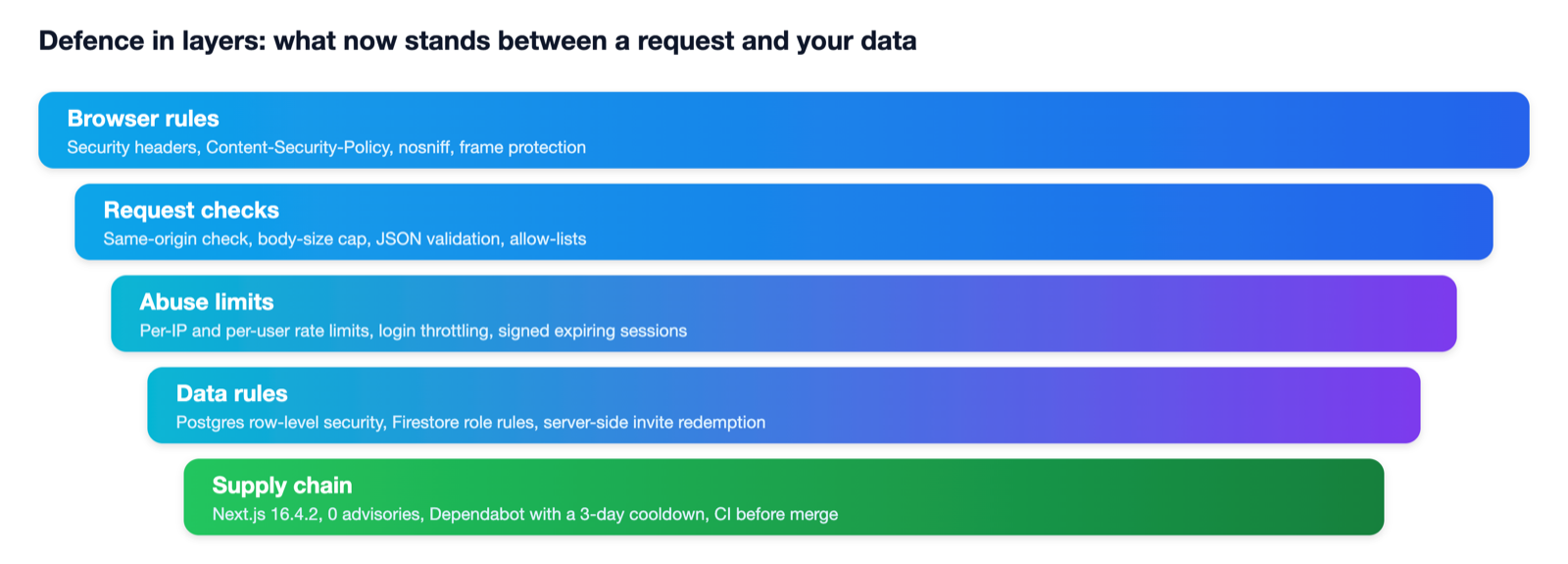
With the findings closed, I used the optional items to strengthen things further, starting with my tools site. A Content-Security-Policy tells the browser which sources a page may load, and MDN notes it is mainly a defence against cross-site scripting.[7] A policy only helps if it does not break the site, so we tested it instead of guessing: all 257 pages in the sitemap were opened in Chromium on the local build and again live, with zero violations, and the file tools still produced downloads.
257
pages opened
every page in the sitemap
0
violations
local build and live site
0
third-party origins
the policy allows none
The policy allows the site’s own origin, in-memory blob files and two WebAssembly engines. Tools that merge, compress, protect and convert files still produced downloads under it.
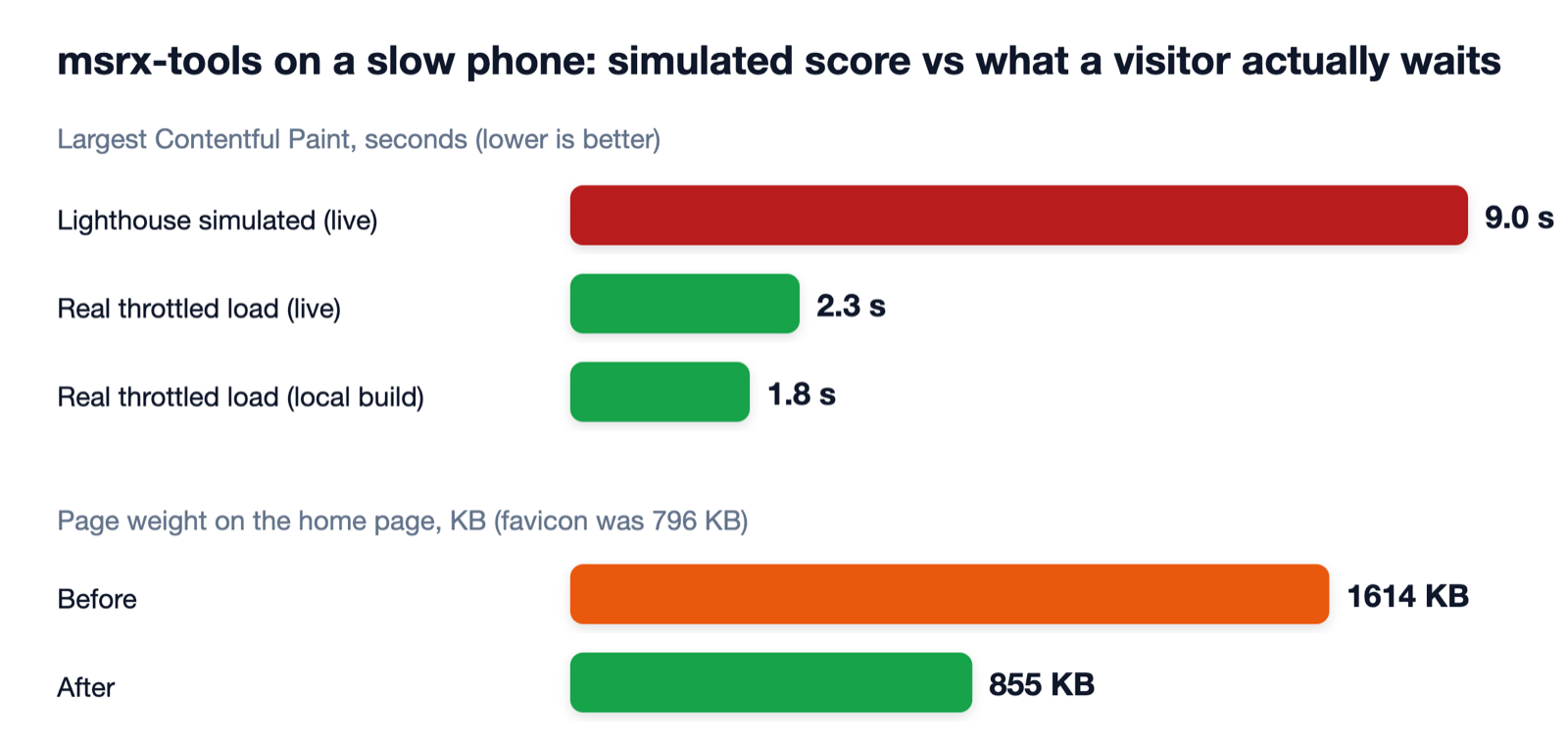
The review had flagged the tools site as slow. Lighthouse in its simulated mode gave a mobile load time of about 9.0 seconds, but under real throttling the page painted its heading in 2.3 seconds on the live site, with a score of 93. One real waste did turn up: the favicon was a 796 KB copy of a social image. It is now 19 KB, and the home page weighs about half as much.
| Before | After | |
|---|---|---|
| Next.js advisories | Critical RCE advisories on 25 apps | 0 left, on 16.4.2 |
| Content-Security-Policy on the tools site | None | 257 pages, 0 violations, on the local build and live |
| Home-page favicon | 796 KB | 19 KB |
| Home-page weight | 1,614 KB | 855 KB |
| Dependency updates | Manual, when remembered | Weekly grouped pull requests across 25 repositories |
| Font loading at build time | Downloaded from a third party | Packaged with each app, no outside call |
From the author’s report. Lighthouse and page-weight numbers are the author’s own measurements.
One change I left alone on purpose. The review suggested caching the public pages of a community library app, but those pages read the signed-in user and hold children’s data, and a cached copy of a privacy setting could delay a privacy switch. A targeted cache with instant invalidation is possible, but it deserves its own tested change. A scan finds options; judgement picks them.
Keeping it fixed
A one-off sweep goes stale, so I added automation. A CI workflow now runs the tests and a production build on pull requests, and Dependabot opens one grouped weekly pull request for patch updates in 25 repositories. I added a three-day cooldown so a freshly published, possibly hijacked release is not proposed straight away; GitHub’s documentation says the cooldown applies to version updates, not to security updates, which are not delayed.[8]
- 1
A new advisory or update appears.
- 2
Dependabot opens one grouped weekly pull request, after a cooldown for version updates.
- 3
CI runs the tests and a production build on a clean clone.
- 4
Where CI exists, the grouped patch pull request merges itself. Minor and major bumps stay manual.
- 5
Where CI does not exist yet, it waits for a one-click human review.
The author’s setup. GitHub’s documentation says the cooldown applies to version updates, not security updates.
Auto-merge is on only where CI exists, for grouped patch updates; minor and major bumps stay manual. The merge job never checks out or runs a pull request’s code; it only reads the finished CI result and calls the merge API. The next Next.js advisory should arrive as a pull request within days, and on two of my apps it can merge itself.
- Found
A critical, account-wide problem
One class of framework flaw across 25 apps, found in one sweep rather than one at a time.
- Fixed
Nearly everything, quickly
11 of 14 findings closed and verified, including all four high-severity items.
- Proved
Fixes checked on the live system
Live requests, console checks and a browser crawl, not just merged code.
- Learned
Merged is not live
Hand-deployed apps were weeks behind. Finding that was worth more than any single bug.
- Kept
A system that stays fixed
CI, weekly dependency pull requests and self-merging patches where tests exist.
From the author’s report, summarised.
Your turn: scan your own apps with AI
Here is my honest pitch. If you run any website, app or API, a small or large one, you almost certainly have an old dependency, a missing limit or a loose database rule that you have never looked at. AI makes looking cheap. You do not need a security team. You need a habit.
Please scan your own apps with AI tools, and do it regularly. Not once, not after a scare: on a rhythm, the way you would renew insurance or service a vehicle. The incident in our previous article showed what happens when old flaws meet new tools: the window between a flaw becoming known and being used is shrinking, so the best defence is to find and fix yours first.
| How often | What to do | Roughly |
|---|---|---|
| Every week | Merge or review the grouped dependency pull request | Minutes |
| Every month | Ask an AI coding assistant to review your API routes and database rules, and to read your dependency advisories | An hour or two |
| After any big advisory | Check your own stack against it the same day, and deploy the fix | Same day |
| Every quarter | Run the full sweep: secrets in history, dependencies, tests, browser crawl, a few attack tests on your own build | A day |
| Always | Verify on the live site, not just in the code | Seconds |
Illustration: a starting rhythm of ours, based on the author’s setup. Adjust it to your own risk.
Starting is easier than it sounds. You can begin with plain-language requests to an AI coding assistant working in your repository.
- Routes
“Read every API route in this repo. For each, say who can call it, what input it trusts, and what happens if the input is huge or hostile.”
Finds open proxies, missing checks and unbounded input.
- Rules
“Read my database rules. Who can read or change each table or document? Show me any row a signed-in user should not reach.”
Finds access-control gaps, the top risk in OWASP’s 2025 list.
- Advisories
“Check my lockfile against published advisories. List only what applies to how I use the package.”
Turns a long audit into a short, ranked list.
- Secrets
“Search my git history for keys, tokens and passwords. Do not print any value.”
Find them without copying them into a chat.
- Proof
“For each fix, give me a command I can run against the live site to prove it works.”
Makes ‘merged’ into ‘verified’.
Illustration: prompts of ours in the spirit of the author’s process, not a record of the prompts used. Run them only on code you own or are authorised to test.
Using AI safely, and what it cannot do
AI is a strong helper, not a guarantee. It can be wrong, it can miss things, and a clean scan is not a promise of safety. My rules are simple. I scan only what I own. I keep a human on the approve, merge and deploy buttons. I never paste secrets into a chat; I ask the tool to search without printing values, and I rotate any key that may have leaked. And I verify each fix on the live site.
Scan what you own
Keep a human on the approve button
Paste secrets into a chat
Test other people’s systems
Treat findings as leads
Mind the cost of auto-merge
Illustration: our guidance, in line with the author’s own rules. Not legal advice.
The report was candid about what is left, and so am I. Two low-priority items are still open on my list, and a couple of settings need me to act in a console. Honest scoreboards beat perfect-looking ones. The point is not zero findings; it is a short list, a fast fix and a habit that does not depend on memory.
The message
One sweep, 70 repositories, 14 findings, 11 closed and verified, no critical advisories left, and a system that now proposes its own patches. None of it needed a security team, only AI tools, a few evenings and the willingness to check the live site. If it works for a one-person portfolio of small apps, it can work for yours.
Use AI to scan your own apps on a regular rhythm, fix what it finds, keep a human on the approve button, and always verify the fix on the live site.
Quick quiz
Tap a question to check your answer.
Q1What was the single critical finding?
One class of Next.js remote-code-execution advisories that affected all 25 Next.js apps. All were upgraded to 16.4.2, above every patched version.
Q2Why does ‘merged’ not always mean ‘live’?
Some apps are deployed from the command line rather than through git, so a fix on the main branch only reaches visitors after someone deploys it. Check what the host is actually serving.
Q3What does the Dependabot cooldown do, and what does it not do?
It delays version updates for a few days after a release is published. GitHub’s documentation says it does not apply to security updates.
Q4Name two rules for using AI scanning safely.
Scan only what you own or are authorised to test, and keep a human on the approve, merge and deploy steps. Also never paste secrets into a chat, and verify every fix on the live site.
Q5Does a green CI badge prove a repository is tested?
No. CI that only lints or builds also shows green. Before trusting auto-merge, check that a real test suite runs, and fail the build if the number of tests falls below a floor.
Q6How often should you scan?
On a rhythm: grouped dependency updates weekly, an AI review of routes and rules monthly, a same-day check after any big advisory, and a full sweep each quarter. Adjust to your risk.
References
The sources behind this article: original papers, official announcements and documentation. Each link was opened and checked on ; documentation without a fixed date is cited as it read that day.
- [1]
Zaharov-Reutt, A. (23 October 2026). PHP2Shell: the 14-year-old bugs that pulled cyber.gov.au and government sites worldwide offline. iTWire.
Reporting · Supports: Scarlett McDermott’s quote on knowing what software you run
- [2]
Big Sleep team (Google Project Zero and Google DeepMind) (1 November 2024). From Naptime to Big Sleep: Using Large Language Models To Catch Vulnerabilities In Real-World Code. Project Zero.
Announcement · Supports: An AI agent finding an exploitable bug before release, and the defensive case for finding bugs early
- [3]
OWASP Foundation (2025). OWASP Top 10:2025. OWASP.
Guide · Supports: The 2025 list, with Broken Access Control first and Software Supply Chain Failures third
- [4]
GitHub Advisory Database (14 October 2026). Next.js: Unauthenticated Remote Code Execution in `use cache` functions returning typed arrays (GHSA-673q-mjm6-r5xr). GitHub.
Documentation · Supports: Critical 9.5; affects next 16.0.0 to 16.4.0; patched 16.4.1; advises upgrading even without such functions
- [5]
GitHub Advisory Database (14 October 2026). Next.js: Unauthenticated Remote Code Execution in Image Optimization API when SVG files are used (GHSA-2464-fhr4-w9xw). GitHub.
Documentation · Supports: Critical 9.5; affects 10.0.0 to 15.5.27 and 16.0.0 to 16.4.0; patched 15.5.28 and 16.4.1; glibc-based Linux
- [6]
GitHub Advisory Database (22 September 2026). Next.js: Remote Code Execution in next/og ImageResponse (GHSA-vcvr-r3jv-pc5j). GitHub.
Documentation · Supports: Critical 9.5; affects 16.2.0 up to 16.3.6; patched 16.3.6; applies when attacker-controlled values reach SVG content
- [7]
MDN Web Docs. Content Security Policy (CSP). MDN (accessed 25 October 2026).
Documentation · Supports: What a CSP is and that it is mainly a defence against cross-site scripting
- [8]
GitHub Docs. Dependabot options reference. GitHub Docs (accessed 25 October 2026).
Documentation · Supports: The cooldown option, which delays version updates but not security updates
How this article was made
Researched and drafted with the help of AI assistants, checked against the sources above, and published by Mrinal Singh Raja as general information, not professional advice. Facts come from the sources listed and may change, so please check them before relying on them. Spotted a mistake? Tell us and we will correct it. Our editorial standards explain how AI is used here.
Next.js and Vercel, GitHub and Dependabot, Cloudflare, Google, OWASP and the other products and organisations named are independent of MSRX, and this article is not affiliated with or endorsed by any of them. The scan figures come from my own security report of 25 October 2026, which was produced with AI tools and is not a public or independently audited document; it does not record which AI models were used. I describe only findings that are fixed and checked, and I leave out anything that could help an attacker. Advisory and documentation facts were checked on 25 October 2026 and may change. The advisory screenshot belongs to GitHub. Do not scan or test systems you do not own or have permission to test.