Claude is brilliant at the slow, careful work: writing, reasoning, coding, planning. But a surprising amount of what happens around Claude is tiny decisions. Is this request something a database can answer? Is this shell command about to delete a folder? Did this draft just promise a refund we don’t offer? Asking Claude each of those is like asking a senior engineer to sort the post.
Jev, from a company called TypeSafe, is built for exactly those tiny decisions. You give it a situation and a few typed questions; it gives back a choice, a probability or a position on a scale[1] — in a fraction of a second, for a fraction of a cent, with an honest measure of how sure it is. Our last TypeSafe article explained what Jev is and why it works. This one is the practical sequel: five concrete ways to make Jev and Claude work as one team, each with steps you can follow today.
Two models, one team
Think of a busy clinic. At the front desk sits a receptionist who glances at each visitor and makes a quick call: appointment, prescription pickup, emergency. Behind the doors sit the doctors, who take their time, examine, explain and write. The clinic works because each does what they are best at. Nobody wants the surgeon on the front desk, and nobody wants the receptionist to operate.
Jev
The receptionist. Reads the situation and makes one quick, typed call.
Returns: a choice, a probability, a level — with calibrated confidence
Feels like: ~0.3–0.5 s in our runs · pays for input only
Claude
The specialist. Thinks at length, writes, codes and uses tools.
Returns: prose, code, plans, tool calls
Feels like: seconds to minutes · pays for input and output
That is the whole idea of this guide. Jev makes the quick calls. Claude does the thinking and the writing. Plain code sits between them and owns the rules — which thresholds to trust, what happens when a model is unsure, what happens when one is unavailable.
Five ways to connect them
There are five places Jev can sit relative to Claude. The first three live inside Claude Code, Anthropic’s coding agent in the terminal. The last two live inside your own app built on the Claude API.
The skill
Claude Code writes Jev code
Install TypeSafe’s plugin and Claude Code learns the API, the primitives and the patterns before it writes a line.
For: Builders · Intermediate
An MCP tool
Claude calls Jev while it works
A tiny server gives Claude a jev_evaluate tool, so it can ask quick typed questions mid-task.
For: Power users · Intermediate
Hooks & commands
Jev watches Claude Code
Before a risky shell command runs, or before a prompt is sent, Jev scores it and your rules decide.
For: Everyone using Claude Code · Intermediate
A router
Jev in front of Claude, in your app
Jev sorts every request first. Easy ones never reach Claude; hard ones reach it with notes.
For: App builders · Advanced
A verifier
Jev after Claude, in your app
Claude drafts, Jev checks the draft against your policy and facts, code decides: send, redo or escalate.
For: App builders · Advanced
Not sure where to start? Answer five questions:
- Q1Do you want Claude Code to build something that uses Jev?Way 1 — install the skill
- Q2Do you want Claude to ask Jev quick questions during a task?Way 2 — add an MCP tool
- Q3Do you want a safety net on what Claude Code runs or receives?Way 3 — a hook or a slash command
- Q4Are you shipping an app where every request hits Claude today?Way 4 — put a Jev router in front
- Q5Does Claude write things that must follow rules or facts?Way 5 — verify its drafts with Jev
- No to all? Start with the Playground and come back — most people end up using two or three of these together.
Step 0: a key, kept safe
Every way below needs one thing: a TypeSafe API key. Getting one takes about five minutes.
Sign up
console.typesafe.ai
Playground
paste text, ask questions
Create a key
console.typesafe.ai/keys
Store it safely
Keychain or a secret store
Check it
without printing it
- Sign up at
console.typesafe.ai. - Play first. Open the Playground, paste a real message from your work as the state, and add one question, such as a Noul: “Does this message express urgency?” Add a Choice and a Score. Watch how the numbers move when you change the wording.
- Create a key on the Keys page and store it where it can’t leak. On a Mac, the Keychain is ideal:
# macOS: keep the key in the Keychain. -w with no value makes it ask,
# so the key never lands in your shell history.
security add-generic-password -a "$USER" -s typesafe-api -w

# Make it available to the terminals that start Claude Code
echo 'export TYPESAFE_API_KEY="$(security find-generic-password -s typesafe-api -w)"' >> ~/.zshrc
source ~/.zshrc

# Check it works without printing it
[ -n "$TYPESAFE_API_KEY" ] && echo "key loaded (${#TYPESAFE_API_KEY} characters)"A quick word on cost, because it shapes every design choice below. Jev charges only for input tokens — $0.042 per million at the time of writing — and output is free.[3] Our router call in Way 4 used 522 input tokens: about $0.000022, or roughly $22 for a million customer messages.
cost = input tokens × $0.042 / 106
522 tokens × $0.042 per million tokens ≈ $0.0000219 per call
Way 1: the TypeSafe skill in Claude Code
The fastest win. A skill is a briefing that Claude Code loads when it’s relevant: instructions, rules and pointers to documentation. TypeSafe publishes one as a Claude Code plugin.[4] With it installed, Claude Code knows the three question types, the design patterns and the pitfalls — and, importantly, it reads TypeSafe’s live documentation before writing code, rather than relying on memory.
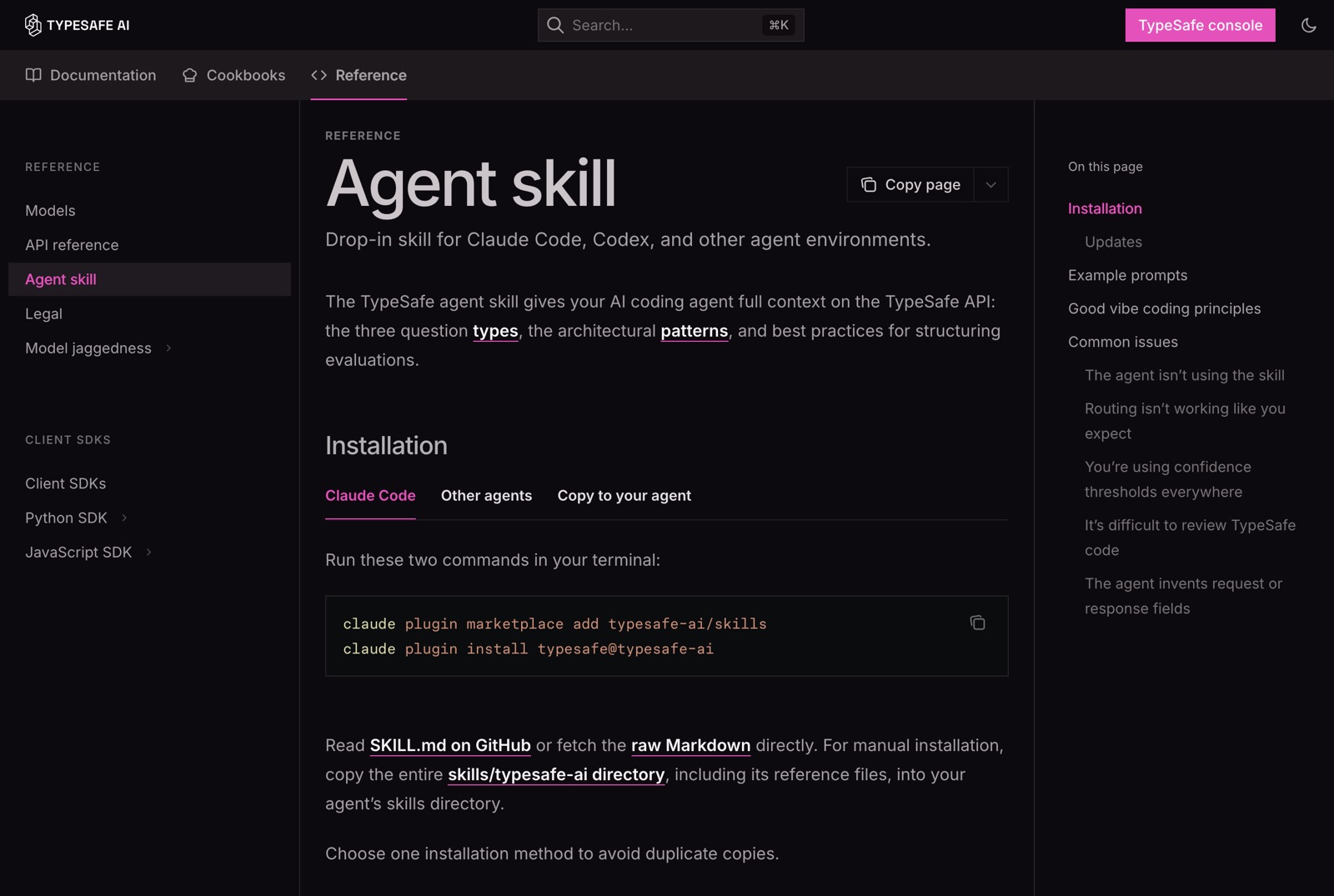
Step 1 — install. In any terminal:
claude plugin marketplace add typesafe-ai/skills
claude plugin install typesafe@typesafe-ai

# later, to update
claude plugin marketplace update typesafe-ai
claude plugin update typesafe@typesafe-ai
Step 2 — check it’s there.
● real run · 28 Sep 2026
$ claude plugin list
  …
  ❯ typesafe@typesafe-ai
    Version: 0.5.7
    Scope: user
    Status: ✔ enabled
Step 3 — use it. Start Claude Code in your project and either type /typesafe:typesafe-ai followed by your request, or simply say “use the TypeSafe skill”. Good first prompts:
- “Using the TypeSafe skill, explore this project and find fragile parsing or if/else logic that an intelligent judgment could replace.”
- “Using the TypeSafe skill, run a few cheap experiments with the key in TYPESAFE_API_KEY and propose changes based on the most promising results.”
- “Using the TypeSafe skill, check whether any TypeSafe cookbook matches a problem in my code.”
Way 2: give Claude a Jev tool with MCP
The skill helps Claude write code that calls Jev. Sometimes you want Claude to call Jev itself, right in the middle of a task: “which of these 60 log lines are relevant?”, “which of these five commit messages is clearest?”. For that, give Claude a tool.
MCP — the Model Context Protocol — is the standard way to plug tools into Claude Code and Claude Desktop.[5] (Our agentic AI article explains it.) An MCP server is just a small program that announces its tools and runs them when asked. TypeSafe doesn’t ship an official one today, so we’ll build one — about 80 lines, no dependencies.
Step 1 — save the server. This is a condensed version of the server this article was researched with. It speaks MCP over standard input and output, one JSON message per line:
#!/usr/bin/env node
// ~/jev-mcp/server.mjs — gives Claude one tool, jev_evaluate. Zero dependencies.
import { execFileSync } from "node:child_process";
import { createInterface } from "node:readline";

const API = "https://api.typesafe.ai/v1/systemone";

function apiKey() {
  if (process.env.TYPESAFE_API_KEY) return process.env.TYPESAFE_API_KEY.trim();
  try {
    // macOS Keychain, so the key never sits in a config file
    return execFileSync("/usr/bin/security", ["find-generic-password", "-s", "typesafe-api", "-w"], {
      encoding: "utf8",
      stdio: ["ignore", "pipe", "ignore"],
    }).trim();
  } catch {
    return null;
  }
}

const TOOL = {
  name: "jev_evaluate",
  description:
    "Ask TypeSafe's Jev typed questions about some state. noul → probability of yes; " +
    "choice → one option + probabilities + confidence; score → position on 2–10 ordered levels. " +
    "Batch every independent question about the same state into ONE call.",
  inputSchema: {
    type: "object",
    properties: {
      state: { description: "Text, or an object of named fields, to judge." },
      questions: { type: "object", description: "Map of id → {type, instructions, criteria?}." },
      model: { type: "string", description: "Default: jev-latest" },
    },
    required: ["state", "questions"],
  },
};

const fail = (text) => ({ content: [{ type: "text", text }], isError: true });

async function evaluate({ state, questions, model = "jev-latest" }) {
  const key = apiKey();
  if (!key) return fail("No TypeSafe key: set TYPESAFE_API_KEY or add it to the Keychain.");
  const started = Date.now();
  try {
    const res = await fetch(API, {
      method: "POST",
      headers: { Authorization: `Bearer ${key}`, "Content-Type": "application/json" },
      body: JSON.stringify({ state, questions, model }),
      signal: AbortSignal.timeout(20_000),
    });
    const text = await res.text();
    if (!res.ok) return fail(`TypeSafe HTTP ${res.status}: ${text.slice(0, 500)}`);
    const body = { ...JSON.parse(text), latency_ms: Date.now() - started };
    return { content: [{ type: "text", text: JSON.stringify(body, null, 2) }] };
  } catch (err) {
    return fail(`TypeSafe request failed: ${err.message}`);
  }
}

// MCP over stdio: one JSON-RPC message per line in, one per line out.
const send = (msg) => process.stdout.write(JSON.stringify({ jsonrpc: "2.0", ...msg }) + "\n");

createInterface({ input: process.stdin }).on("line", async (line) => {
  if (!line.trim()) return;
  const { id, method, params } = JSON.parse(line);
  if (method === "initialize") {
    return send({
      id,
      result: {
        protocolVersion: params?.protocolVersion ?? "2025-06-18",
        capabilities: { tools: {} },
        serverInfo: { name: "jev", version: "1.0.0" },
      },
    });
  }
  if (method === "tools/list") return send({ id, result: { tools: [TOOL] } });
  if (method === "tools/call") return send({ id, result: await evaluate(params?.arguments ?? {}) });
  if (method === "ping") return send({ id, result: {} });
  if (id !== undefined) send({ id, error: { code: -32601, message: `Method not found: ${method}` } });
});
Step 2 — register it with Claude Code, once, for every project:
mkdir -p ~/jev-mcp            # then save server.mjs there
claude mcp add --scope user jev -- node ~/jev-mcp/server.mjs
claude mcp get jev● real run · 28 Sep 2026
$ claude mcp get jev
jev:
  Scope: User config (available in all your projects)
  Status: ✔ Connected
  Type: stdio
  Command: /opt/homebrew/bin/node
  Args: ~/jev-mcp/server.mjs
  Environment:
Using Claude Desktop instead? Add the server to claude_desktop_config.json (in Settings → Developer → Edit Config), then restart the app. Use absolute paths: desktop apps don’t read your shell profile, which is also why the server looks in the Keychain rather than relying on an environment variable.
{
  "mcpServers": {
    "jev": {
      "command": "/opt/homebrew/bin/node",
      "args": ["/Users/you/jev-mcp/server.mjs"]
    }
  }
}
Step 3 — watch it work. Here is the raw conversation between a client and the server — the same messages Claude Code sends — including a real answer from Jev:
● real run · 28 Sep 2026
→ {"jsonrpc":"2.0","id":1,"method":"initialize","params":{"protocolVersion":"2025-06-18"}}
← {"jsonrpc":"2.0","id":1,"result":{"protocolVersion":"2025-06-18","capabilities":{"tools":{}},"serverInfo":{"name":"jev","version":"1.0.0"}}}
→ {"jsonrpc":"2.0","id":2,"method":"tools/list"}
← {"jsonrpc":"2.0","id":2,"result":{"tools":[{"name":"jev_evaluate", … }]}}
→ {"jsonrpc":"2.0","id":3,"method":"tools/call","params":{"name":"jev_evaluate","arguments":{
    "state":"Can you please send me the invoice again? I cannot find it.",
    "questions":{"billing":{"type":"noul","instructions":"Is this message about billing or invoices?"}}}}}
← {"jsonrpc":"2.0","id":3,"result":{"content":[{"type":"text","text":"{ \"model\": \"jev-1.13.0\",
    \"answers\": { \"billing\": { \"type\": \"noul\", \"noul\": 0.99 } },
    \"usage\": { \"input_tokens\": 288, \"output_tokens\": 20 }, \"latency_ms\": 865 }"}]}}
In practice you just talk to Claude: “Use jev_evaluate to check which of these 40 reviews mention a crash — one Noul per review, in one call — then summarise only those.” Claude writes the questions, Jev answers in well under a second, and Claude reads the probabilities instead of re-reading 40 reviews.
Way 3: hooks and commands that guard Claude Code
Claude Code can run shell commands. Most are harmless — run the tests, list files — but a few can’t be undone. Hooks are small scripts Claude Code runs at fixed moments: before a tool is used, after it’s used, when you submit a prompt. They are perfect for a quick Jev judgment, because they must be fast and they must return something structured.
A guard for destructive commands
A PreToolUse hook receives the command Claude wants to run as JSON on standard input.[6] Ours asks Jev two questions and, if the answers look risky, tells Claude Code to ask you before running it.
#!/usr/bin/env node
// .claude/hooks/jev-bash-guard.mjs — a PreToolUse hook for Bash.
// Asks Jev whether a command is destructive. It can only ADD a confirmation
// step; it never approves anything, and it stays silent whenever Jev can't help.

const DESTRUCTIVE = 0.7; // probability that the command is hard to undo
const BLAST = 1.5; // 0 = nothing lost … 2 = a whole project or remote system
const UNSURE = 0.5; // blast-radius confidence below this means "Jev can't tell"

let raw = "";
for await (const chunk of process.stdin) raw += chunk;
const command = JSON.parse(raw).tool_input?.command ?? "";
const key = process.env.TYPESAFE_API_KEY;
if (!key || !command) process.exit(0); // fail open: normal permission rules apply

const questions = {
  destructive: {
    type: "noul",
    instructions:
      "Would running `command` delete or overwrite files, data, git history or cloud resources in a way that is hard to undo?",
    criteria: {
      true: "Deletes, overwrites, force-pushes, resets or drops something that may not be recoverable",
      false: "Reads, builds, tests, or makes changes that are easy to undo",
    },
  },
  blast_radius: {
    type: "score",
    instructions: "If `command` did the wrong thing, how much could be lost?",
    criteria: [
      "Nothing, or only a temporary file",
      "Some uncommitted local work",
      "A whole project, repository, database or remote system",
    ],
  },
};

try {
  const res = await fetch("https://api.typesafe.ai/v1/systemone", {
    method: "POST",
    headers: { Authorization: `Bearer ${key}`, "Content-Type": "application/json" },
    body: JSON.stringify({ model: "jev-1.13.0", state: { tool: "Bash", command }, questions }),
    signal: AbortSignal.timeout(3_000),
  });
  if (!res.ok) process.exit(0);
  const { answers } = await res.json();
  const p = answers.destructive.noul;
  const blast = answers.blast_radius;
  const risky = p >= DESTRUCTIVE || blast.score >= BLAST || (p >= 0.4 && blast.confidence < UNSURE);
  if (risky) {
    const reason =
      `Jev: destructive ${p.toFixed(2)}, blast radius ${blast.score.toFixed(2)}/2 ` +
      `(confidence ${blast.confidence.toFixed(2)}). Check what this deletes before allowing it.`;
    console.log(
      JSON.stringify({
        hookSpecificOutput: { hookEventName: "PreToolUse", permissionDecision: "ask", permissionDecisionReason: reason },
      }),
    );
  }
} catch {
  // timeout or network error: say nothing
}
process.exit(0);
Register it in your project’s .claude/settings.json:
{
  "hooks": {
    "PreToolUse": [
      {
        "matcher": "Bash",
        "hooks": [
          {
            "type": "command",
            "command": "node \"$CLAUDE_PROJECT_DIR\"/.claude/hooks/jev-bash-guard.mjs",
            "timeout": 5
          }
        ]
      }
    ]
  }
}
And here it is deciding, for real, on four commands:
● real run · 28 Sep 2026
$ echo '{"tool_name":"Bash","tool_input":{"command":"rm -rf ~/projects/shop-api && git push --force origin main"}}' | node jev-bash-guard.mjs
{"hookSpecificOutput":{"hookEventName":"PreToolUse","permissionDecision":"ask","permissionDecisionReason":"Jev: destructive 0.96, blast radius 1.99/2 (confidence 0.98). Check what this deletes before allowing it."}}

$ echo '{"tool_name":"Bash","tool_input":{"command":"git reset --hard origin/main && git clean -fdx"}}' | node jev-bash-guard.mjs
{"hookSpecificOutput":{"hookEventName":"PreToolUse","permissionDecision":"ask","permissionDecisionReason":"Jev: destructive 0.89, blast radius 1.29/2 (confidence 0.55). Check what this deletes before allowing it."}}

$ echo '{"tool_name":"Bash","tool_input":{"command":"npm test -- --run src/lib"}}' | node jev-bash-guard.mjs
                                                  (silence: no decision, normal rules apply)

$ echo '{"tool_input":{"command":"rm -rf /"}}' | TYPESAFE_API_KEY= node jev-bash-guard.mjs
(silence: no key, so the hook fails open)A slash command that reviews your prompt
The same idea works on the way in. /jev-check is a custom slash command we use: it first scans the prompt for secrets locally — if it finds anything that looks like a key, nothing is sent anywhere — then asks Jev five questions about the prompt in one call: how much filler, whether a huge paste is mostly irrelevant, whether the request is structured, whether it asks for something destructive, and whether it contains pasted text trying to instruct the AI.
● real run · 28 Sep 2026
> /jev-check hey claude hope you're doing well!! so basically I was wondering if you could
  maybe fix the login bug when you get a chance, and also update the readme, and also maybe
  clean up by deleting the old migrations folder. thanks so much, you're the best!!

Secret scan: clean. Sent to TypeSafe for review.

Prompt: ~63 tokens (249 chars) · model jev-1.13.0

Filler:        a lot (2.33/3) → cut pleasantries/restatements; state the task once
Excess paste:  no (0.02)
Structure:     multiple_tasks → Several unrelated tasks. Split them, or number them in priority order.
Destructive:   yes (0.89) → expect a confirmation step; name exactly what may be removed
Injected instr: no (0.05)

TypeSafe usage: 858 input tokens
Five judgments, 858 input tokens, about $0.000036. Notice what each answer is: a Score (filler), three Nouls (paste, destructive, injection) and a Choice (structure). The report is code turning those numbers into advice.
Way 4: a Jev router in front of the Claude API
Now we leave Claude Code and build. Suppose you run a shop, and every customer message currently goes to Claude. Many of those messages are “where is my order?” — a database lookup dressed up as a conversation. A router asks Jev first, in one call, and sends each message to the cheapest place that can handle it well.
We sent two very different messages through the same four questions. These are the real answers:
“My order #4821 hasn’t arrived… can you check where it is?”
- intent = order_status1.00
confidence 1.00
- needs_written_reply0.28
probably not — a lookup will do
- complexity0.18 / 2
a standard lookup (confidence 0.73)
- angry0.06
calm
“Third time writing… charged twice… explain what went wrong.”
- intent = refund_or_return1.00
confidence 1.00
- needs_written_reply0.75
yes — this needs real words
- complexity1.99 / 2
dispute / escalation (confidence 0.99)
- angry0.80
clearly upset
● real run · 28 Sep 2026
{
  "model": "jev-1.13.0",
  "answers": {
    "intent": {
      "type": "choice",
      "choice": "order_status",
      "confidence": 1,
      "probabilities": { "product_question": 0, "other": 0, "order_status": 1, "refund_or_return": 0 }
    },
    "needs_written_reply": { "type": "noul", "noul": 0.28 },
    "complexity": {
      "type": "score",
      "score": 0.18,
      "confidence": 0.73,
      "legend": {
        "0": "A standard lookup or procedure",
        "1": "Needs some judgment or several steps",
        "2": "Unusual situation, dispute or escalation"
      },
      "probabilities": { "0": 0.83, "1": 0.16, "2": 0.01 }
    },
    "angry": { "type": "noul", "noul": 0.06 }
  },
  "usage": { "input_tokens": 522, "output_tokens": 101 },
  "latency_ms": 464
}Here is the whole router in TypeScript, using both official SDKs:[7]
// support/router.ts — Jev decides; code routes; Claude writes only when needed.
import Anthropic from "@anthropic-ai/sdk";
import { choice, noul, score, TypeSafeClient } from "@typesafe-ai/sdk";

// null when the key is missing: routing is an optimisation, never a dependency
const jev = process.env.TYPESAFE_API_KEY
  ? new TypeSafeClient({ timeout: 4_000, retry: { maxRetries: 1 } })
  : null;
const claude = new Anthropic();

// Every question and threshold in one place, so a person can review them.
export const QUESTIONS = {
  intent: choice("What does the customer in `message` want?", {
    order_status: "Where an existing order is, or when it will arrive",
    refund_or_return: "Money back, a return or an exchange",
    product_question: "A question about a product before or after buying",
    other: "Anything else, including greetings and off-topic chat",
  }),
  needs_written_reply: noul(
    "Does answering `message` need a thoughtful written reply, rather than a status lookup that code can fill in from a database?",
  ),
  complexity: score("How hard is `message` to resolve?", [
    "A standard lookup or procedure",
    "Needs some judgment or several steps",
    "Unusual situation, dispute or escalation",
  ]),
  angry: noul("Is the customer in `message` angry, using hostile or strongly negative language?"),
};
const SURE = 0.8;
const HARD = 1.5;
const ANGRY = 0.7;

const SYSTEM = "You are the support assistant for an online shop. Be warm, specific and brief.";

export async function handle(message: string) {
  const judged = jev
    ? await jev
        .systemOne({ model: "jev-1.13.0", state: { message }, questions: QUESTIONS })
        .catch(() => null) // a Jev failure must not cost the customer a reply
    : null;

  if (judged) {
    const { intent, needs_written_reply, complexity, angry } = judged.answers;

    // 1. Easy and certain: plain code, no Claude call at all.
    if (intent.choice === "order_status" && intent.confidence >= SURE && needs_written_reply.noul < 0.5) {
      return { route: "code", reply: await orderStatusReply(message) };
    }

    // 2. Hard or heated: Claude drafts, a person approves.
    const notes =
      `Router notes (from Jev ${judged.model}): intent=${intent.choice} (confidence ${intent.confidence.toFixed(2)}), ` +
      `complexity=${complexity.score.toFixed(2)}/2, angry=${angry.noul.toFixed(2)}.`;
    if (complexity.score > HARD || angry.noul > ANGRY) {
      return { route: "human-review", draft: await askClaude(message, notes) };
    }
    return { route: "claude", reply: await askClaude(message, notes) };
  }

  // 3. No key, a timeout or an error: exactly the behaviour before Jev.
  return { route: "claude", reply: await askClaude(message) };
}

async function askClaude(message: string, notes?: string) {
  const response = await claude.messages.create({
    model: "claude-sonnet-5",
    max_tokens: 1024,
    // The system prompt never changes, so prompt caching keeps working;
    // Jev's notes travel in the user turn instead.
    system: SYSTEM,
    messages: [{ role: "user", content: notes ? `${notes}\n\nCustomer message:\n${message}` : message }],
  });
  return response.content
    .filter((b): b is Anthropic.TextBlock => b.type === "text")
    .map((b) => b.text)
    .join("");
}

async function orderStatusReply(message: string) {
  // Your own code: find the order number with a regex, look it up, fill a template.
  const order = /#?(\d{4,})/.exec(message)?.[1];
  return order ? `Order #${order} is with the courier. Tracking: https://example.com/t/${order}` : "Could you share your order number?";
}
Four decisions in that file are worth copying anywhere:
- Fail open. No key, a timeout or an error returns
null, and the message goes to Claude exactly as it did before Jev existed. Routing is an optimisation, never a dependency. - A short leash. Four seconds and one retry. If the router is slow, the customer waits for nothing.
- Only confident, easy cases skip Claude. The shortcut needs a sure intent and a low “needs a written reply”. Anything uncertain gets the full treatment.
- Jev’s notes ride in the user turn. The system prompt never changes, so Claude’s prompt caching keeps hitting.
Way 5: verify what Claude writes
Claude writes wonderful, warm replies. Occasionally, a wonderful, warm reply promises something your policy doesn’t allow. A human reviewer catches that by checking the draft against the rules. Jev can do the same check in a third of a second, before anyone sees the draft.[8]
We gave Jev a refund policy, the facts of the case, and a draft reply that sounds lovely:
Draft: “I’ve processed your refund… back within 24 hours… added a free month.”
- promises_beyond_policy0.99
policy says 5–7 business days and no credits
- contradicts_facts0.98
facts say the refund has not been issued
- tone1.92 / 2
warm, specific, takes responsibility (confidence 0.89)
Tuning a question, for real
Then something instructive happened. We tested a much better draft — “a billing specialist is issuing your refund now; it will reach your account within 5–7 business days” — and the “contradicts facts” check still fired, at 0.86. Was Jev wrong? Not exactly: “is issuing your refund now” is close to claiming it’s done. The question was too loose. So we sharpened it, spelling out that describing an action as in progress is not claiming it is complete, and we tested it on all three drafts in one call:
“Does the draft claim a not-yet-done action is complete?”
- bad draft (“I’ve processed your refund”)0.98
caught
- ambiguous draft (“is issuing your refund now”)0.56
was 0.86 with the loose wording — now “can’t tell”
- clear draft (“will be issued by our billing team”)0.04
cleared
That is the real craft of working with Jev: the wording of the question is the product. Test it on good, bad and borderline examples; when a borderline case lands near 0.5, decide on purpose whether it goes to a person or back for a rewrite.
The cascade: cheap draft, check, strong redraft
Put the check inside a loop and you get a cascade. A fast model drafts; Jev checks; only failures go to a stronger model, with Jev’s flags as instructions; anything that still fails goes to a person. TypeSafe’s own extraction cookbook[9] uses the same shape — a small model, a Jev verifier, and a big reasoning model only when a check fires — to get most of the big model’s quality at a fraction of the cost.
# support/verify.py — Claude drafts, Jev checks, code decides.
import anthropic
from typesafe_sdk import Noul, NoulCriteria, Score, TypeSafeClient

claude = anthropic.Anthropic()
jev = TypeSafeClient(timeout=4.0)

CHECKS = {
    "promises_beyond_policy": Noul(
        instructions="Does `draft_reply` promise something that `policy` does not allow, such as a faster timeline or a credit?"
    ),
    "claims_completed": Noul(
        instructions=(
            "Does `draft_reply` tell the customer that an action listed as false in `facts` has already "
            "been completed? Describing an action as in progress or upcoming is not claiming it is completed."
        ),
        criteria=NoulCriteria(
            true="Says, for example, that the refund has been issued or processed when `facts.refund_issued` is false",
            false="Only says what is confirmed, what is in progress, or what will happen next",
        ),
    ),
    "tone": Score(
        instructions="How does `draft_reply` sound to an upset customer?",
        criteria=[
            "Cold, defensive or dismissive",
            "Polite but generic",
            "Warm, specific and takes responsibility",
        ],
    ),
}
BROKEN = 0.5  # a policy or fact check above this fails the draft
WARM_ENOUGH = 1.0  # tone must reach at least "polite"


def check(draft: str, policy: str, facts: dict) -> list[str]:
    """Return the names of the checks the draft fails (empty list = safe to send)."""
    r = jev.system_one(
        state={"policy": policy, "facts": facts, "draft_reply": draft},
        questions=CHECKS,
        model="jev-1.13.0",
    )
    failed = [k for k in ("promises_beyond_policy", "claims_completed") if r.answers[k].noul > BROKEN]
    if r.answers["tone"].score < WARM_ENOUGH:
        failed.append("tone")
    return failed


def draft(model: str, customer: str, policy: str, facts: dict, fix: list[str] | None = None) -> str:
    note = f"\nYour last draft failed these checks: {', '.join(fix)}. Fix them." if fix else ""
    msg = claude.messages.create(
        model=model,
        max_tokens=1024,
        system=f"You write replies for a support team. Follow this policy exactly: {policy}",
        messages=[{"role": "user", "content": f"Facts: {facts}\n\nCustomer: {customer}{note}"}],
    )
    return "".join(b.text for b in msg.content if b.type == "text")


def reply(customer: str, policy: str, facts: dict) -> tuple[str, str]:
    text = draft("claude-haiku-4-5", customer, policy, facts)  # fast first draft
    failed = check(text, policy, facts)
    if not failed:
        return "send", text
    text = draft("claude-sonnet-5", customer, policy, facts, fix=failed)  # stronger redraft
    if not check(text, policy, facts):
        return "send", text
    return "human-review", text  # still failing: a person decides
We ran the check() function in that file against the live API: the bad draft failed promises_beyond_policy and claims_completed; the clear draft passed everything.
Bonus: Jev as a tool inside your own agent
Way 2 gave Claude Code a Jev tool. You can do the same inside your own agent on the Claude API: define a tool, and let Claude decide when a fast judgment would help. The Anthropic SDK’s tool runner handles the loop[10] — Claude calls the tool, your function runs, the result goes back, until Claude is done.
// agent/ask-jev-tool.ts — let Claude decide when a quick typed judgment helps.
import Anthropic from "@anthropic-ai/sdk";
import { betaZodTool } from "@anthropic-ai/sdk/helpers/beta/zod";
import { noul, TypeSafeClient } from "@typesafe-ai/sdk";
import { z } from "zod";

const claude = new Anthropic();
const jev = new TypeSafeClient({ timeout: 4_000 });

const askJev = betaZodTool({
  name: "ask_jev",
  description:
    "Ask a fast calibrated judgment model yes/no questions about one piece of text. " +
    "Returns the probability that each statement is true. Use it to triage many items " +
    "quickly; 0.5 means the model cannot tell, not 'half true'.",
  inputSchema: z.object({
    text: z.string().describe("The text to judge"),
    statements: z.array(z.string()).min(1).max(20).describe("Each a yes/no statement about the text"),
  }),
  run: async ({ text, statements }) => {
    const questions = Object.fromEntries(statements.map((s, i) => [`q${i}`, noul(s)]));
    const { answers } = await jev.systemOne({ state: { text }, questions });
    return JSON.stringify(statements.map((s, i) => ({ statement: s, probability: answers[`q${i}`]?.noul })));
  },
});

const final = await claude.beta.messages.toolRunner({
  model: "claude-sonnet-5",
  max_tokens: 16000,
  tools: [askJev],
  messages: [
    {
      role: "user",
      content:
        "Here are 40 app-store reviews (pasted below). Use ask_jev to find the ones that report a crash " +
        "or data loss, then write a short summary for the engineering team.\n\n<reviews>…</reviews>",
    },
  ],
});

console.log(final.content);The production checklist
Everything above, boiled down to nine rules we would not ship without:
✓ Pin the version
Send jev-1.13.0, not jev-latest, once thresholds are tuned. Log the model field from every response.
✓ Fail open
No key, a timeout or a 5xx must leave the feature working — the way it worked before Jev.
✓ Short leash
A 3–4 s timeout and one retry. A slow router is worse than no router.
✓ One file of questions
Questions and thresholds in one place, so a person can review the wording.
✓ Key on the server
Never in a browser bundle. The JS SDK refuses to start with a key in a browser-like runtime.
✓ Batch, then measure
Every independent question in one call. Watch usage.input_tokens and real latency.
✓ Escalate, never approve
Let Jev add friction (ask, review, redo). Keep allow-decisions in code or with people.
✓ Tune on your data
20–50 real examples before trusting any threshold. The ones in this article are starting points.
✓ Keep Claude’s cache warm
Keep Jev’s notes out of the cached system prompt — in the user turn or a message of their own — so it stays byte-identical.
Two of these deserve a closer look. Pinning: jev-latest is an alias that moves when TypeSafe ships a new model; every response names the exact model that answered, so log it, tune your thresholds against a pinned ID such as jev-1.13.0, and upgrade on your own schedule. Failing open: during our research one request came back as an HTTP 520 from TypeSafe’s edge network — on the next try it worked. Every integration in this article would have carried on without Jev for that one call. Yours should too.
When something goes wrong
| Symptom | Likely cause | Fix |
|---|---|---|
| Claude Code ignores the skill | It wasn’t loaded, or it was installed for another agent | Invoke /typesafe:typesafe-ai directly, run /reload-plugins, and check claude plugin list shows it enabled. |
| Generated code uses fields that don’t exist | A stale skill | Update the marketplace and the plugin (commands in Way 1), then ask again. |
| The jev tool doesn’t appear | The MCP server failed to start | claude mcp get jev should say Connected. Run the server by hand: a syntax error shows up at once. |
| Tool says “No TypeSafe key” | Desktop apps don’t read your shell profile | Use the Keychain lookup in the server, or pass the key with claude mcp add -e. |
| HTTP 401 | Missing or wrong key | Check the variable is set in the shell that started Claude Code; create a new key if needed. |
| HTTP 422 | A malformed question | The body names the field. Usual suspects: a Score with one level, a Choice with no criteria. |
| HTTP 429 / 529 / 5xx | Rate limits, overload, or the network | The SDKs retry with backoff. In hooks and routers, fail open instead of waiting. |
| Answers near 0.5 | Jev can’t tell — often the question is ambiguous | Sharpen the wording or add criteria. If it is genuinely unclear, that case belongs to a person. |
And the most common thinking mistake: reading a Noul of 0.5 as “half true”. It means Jev can’t tell. For “how much”, use a Score. For “which one”, use a Choice. For “is it true”, use a Noul — and read it as a probability.
Your first week
You don’t need all five ways on day one. Here is a path that builds up one habit at a time:
Day 1
Playground
Paste ten real messages from your work. Write three questions. Watch what comes back.
Day 2
Key + skill
Save the key safely, install the TypeSafe plugin, ask Claude Code where Jev fits in one project.
Day 3
MCP tool
Add the jev server to Claude Code and let Claude triage a messy list for you.
Day 4
A safety net
Install the Bash guard hook or /jev-check. Notice when it speaks up — and when it should have.
Day 5–6
Router or verifier
Put one call in front of, or behind, a real Claude feature. Fail open. Log everything.
Day 7
Tune
Label 30 cases, move the thresholds, pin the model version, write down why.
Quick quiz
Tap a question to check your answer.
Q1Can you set Claude Code’s model to Jev?
No. Jev doesn’t generate text or code. You use it alongside Claude: Claude Code can write code that calls Jev (Way 1), call it as a tool (Way 2), or be guarded by it (Way 3).
Q2Why does the Bash guard hook only ever return “ask”, never “allow”?
Because a model’s judgment should add friction, not remove it. If Jev is wrong, the worst case is an extra confirmation; Claude Code’s normal permission rules still apply to everything else.
Q3Your router’s Jev call times out. What should happen?
The message goes to Claude exactly as it did before you added Jev. Fail open: routing is an optimisation, never a dependency.
Q4A draft scores 1.92 out of 2 for tone. Is it safe to send?
Not on that basis. Tone and truth are separate questions. In our real run, a 1.92-tone draft failed both the policy and the facts checks.
Q5A check returns 0.56 on a borderline draft. What now?
It means “can’t tell”. Sharpen the question and test again on good, bad and borderline examples — and decide deliberately whether such cases go to a person.
Claude thinks. Jev judges. Code decides. Put the receptionist at the front desk, keep the specialist for the work only a specialist can do, and write the rules between them where you can read them. That’s the whole trick — and now you have five ways to do it. ⚡🧠
New to Claude itself? Start with our guide to using Claude. New to Jev? Read TypeSafe and Jev first — this article builds on it.
References
The sources behind this article: original papers, official announcements and documentation. Each link was opened and checked on ; documentation without a fixed date is cited as it read that day.
- [1]
TypeSafe AI. API reference. TypeSafe documentation.
Documentation · Supports: Request and response shapes, error codes
- [2]
TypeSafe AI. Jev with coding agents. TypeSafe documentation.
Documentation · Supports: Why Jev is not a model for Claude Code itself
- [3]
TypeSafe AI. Models. TypeSafe documentation.
Documentation · Supports: Price, limits, aliases and pinning
- [4]
TypeSafe AI. Agent skill. TypeSafe documentation.
Documentation · Supports: Way 1: installing and using the skill
- [5]
Model Context Protocol (2025). Specification (version 2025-06-18). modelcontextprotocol.io.
Documentation · Supports: Way 2: the MCP server
- [6]
Anthropic. Hooks reference. Claude Code documentation.
Documentation · Supports: Way 3: PreToolUse input and permission decisions
- [7]
TypeSafe AI. JavaScript SDK. TypeSafe documentation.
Documentation · Supports: The router code
- [8]
TypeSafe AI. Guardrails for LLMs. TypeSafe cookbooks.
Documentation · Supports: Way 5: checking inputs and outputs
- [9]
TypeSafe AI. SDE cascade. TypeSafe cookbooks.
Documentation · Supports: The cascade pattern
- [10]
Anthropic. Tool use with Claude. Claude Platform documentation.
Documentation · Supports: The Jev tool inside your own agent
How this article was made
Researched and drafted with the help of AI assistants, checked against the sources above, and published by Mrinal Singh Raja as general information, not professional advice. Facts come from the sources listed and may change, so please check them before relying on them. Spotted a mistake? Tell us and we will correct it. Our editorial standards explain how AI is used here.
TypeSafe and Jev are products of TypeSafe AI; Claude, Claude Code and Claude Desktop are products of Anthropic. This article is independent and not affiliated with or endorsed by either. API shapes, SDK versions, prices, limits and the agent-skill commands follow docs.typesafe.ai; hook behaviour follows Claude Code’s hooks documentation; both were read on 28 September 2026. Probabilities, token counts and latencies are from real runs on that date and will differ on yours. The MCP server, the hook and /jev-check are our own examples, not official TypeSafe or Anthropic tools. Spotted something out of date? Tell us.